Scope of our registration observation
Editorial review and source check
On 23/10/2026, we opened “Cadastro” in Portuguese and recorded its fields without entering details, accepting or submitting terms, creating an account or making a transaction. The screenshot does not establish later requirements, approval or availability in every region.
- Observed: field labels and expansion of the promo field.
- Not tested: submission, contact validation, documents, sign-in or account recovery.
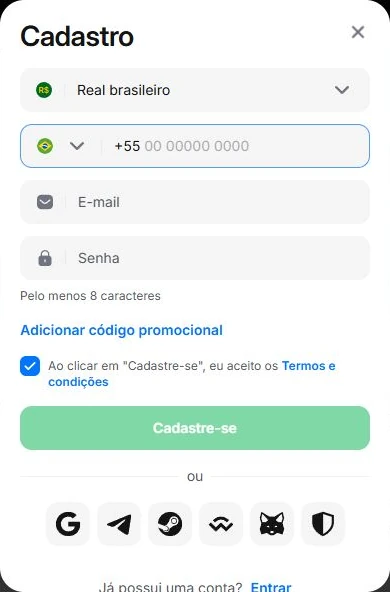
Registration takes place on the platform reached through the affiliate link, not on 1winbrazil.bet. This guide records fields observed in the Portuguese interface on 23/10/2026 and helps you review the step before submission. The check was visual only: no personal information was entered and no account was created.
From this portal to registration
On the home page, “Get started” explains the access steps; “Create my account” opens the destination through https://r1wqahjs.life/?p=95kl. Our guides and code-copying feature are free to use. We may receive commissions for referrals that meet the programme’s conditions.
On the destination we observed, “Cadastre-se” opened “Cadastro”, the Portuguese sign-up modal. Review the address and screen’s context before entering details. The link can redirect to another domain; the portal does not present a rotating mirror address as a permanent destination.
Which fields did we observe?
The modal displayed “Real brasileiro” as currency, a phone field with a +55 reference, email and password, plus “Adicionar código promocional”. The password hint was “Pelo menos 8 caracteres”, meaning at least eight characters. These were labels in that environment, not universal requirements for every country or registration method.
A displayed minimum is not a recommendation to choose the shortest password. Use a unique combination and do not reuse your email password. Google’s official guidance recommends different passwords for important accounts and a trusted password manager when needed.
- Currency: check that the displayed option matches your choice.
- Phone and email: use contacts you control and review their spelling.
- Password: choose a unique combination and keep it private.
- Code: “Adicionar código promocional” means add promotional code.
Review before sending the form
Read every field and preselected preference. Confirm that the details belong to you, that you can access your contacts and that you understand the terms. If you choose to enter LANCE10, check the field and the platform’s messages. This article’s image does not demonstrate acceptance.
Do not send documents to this portal or its editorial contact. Review any verification request within the environment and channels indicated by the platform. Our check did not submit terms or establish which checks would be required after registration.
Already have an account? Use another route
If an account already exists, look for sign-in or recovery options on the destination. Do not register again to resolve a forgotten password or attempt a promotional condition. This article does not confirm that LANCE10 can be added after registration.
Before requesting recovery, check the address and channel you are using. Do not send a password to anyone who contacts you unexpectedly. Registered phone numbers, documents, balances and account access are platform-support matters; this portal’s publisher cannot modify them.
Keep later decisions separate
Creating an account does not require an immediate deposit or participation in an offer. Read the rules and locate help channels and available security options. Do not assume that another service’s limits, timing or features apply here.
For an editorial correction, email contato@1winbrazil.bet with the article’s URL and issue, without credentials or documents. This contact is for portal content. The guide is for adults aged 18 and over; decide your time and spending limits before participating.
Sources and references
- Editorial screenshot: observed registration screen
Fields visible on 23/10/2026, without submitting details.
- Google: create a strong password and a more secure account
Password-security reference. Google Account requirements are not 1win requirements.
Your code for the next step
Independent affiliate portal. We may earn commissions for referrals.
Check code acceptance and conditions directly on 1win.